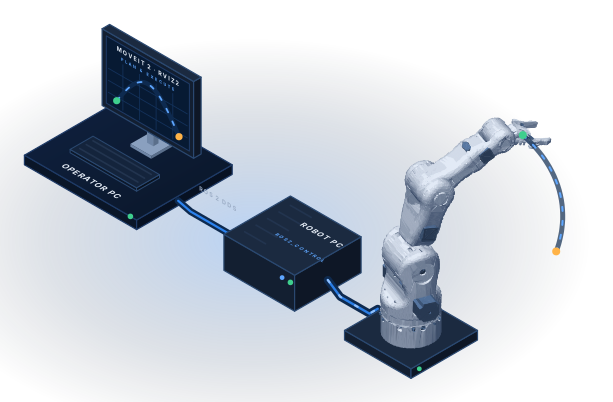
Plan on one computer, move on another
The Robot PC owns the USB link to the controller and runs ros2_control; it has to stay lean and must not carry a 3D GUI. Motion planning and visualization need MoveIt 2, RViz2 and OpenGL, and they must use exactly the same joints, limits and controllers as the Robot PC — otherwise a plan that looks right on the screen is rejected, or worse, executed differently on the arm. The Operator PC is a separate computer and a separate image that joins the Robot PC over ROS 2 DDS, like a second machine on the Ethernet.
One robot model on both computers
The image build takes the robot description and the Fast DDS profile straight from the Robot PC repository (a Compose additional build context). Nothing is copied by hand, so joint names, limits and transport settings cannot drift.
A 5-DOF arm in a 6-D planner
The Moveo has five arm joints and cannot reach an arbitrary pose. pick_ik solves for the tool position only (rotation_scale 0.0), so dragging the interactive marker in RViz2 always finds a solution that OMPL can plan to.
A 3D GUI in a container, on any desktop
RViz2 runs inside the container and draws through WSLg on Windows 11 or X11 on a Linux desktop. Software OpenGL (llvmpipe) is the default, so it starts on every host without a GPU setup.
A ready operator station for the arm
One Docker image, one ROS 2 package and two Compose services: move_group with the MoveIt configuration of the Moveo, RViz2 with the MotionPlanning panel, and a shell on the same network for the ROS 2 tools.
Planning in RViz2
Drag the gripper marker, plan with OMPL, execute on the Robot PC, use the named poses.
Architecture
Nodes, topics and actions across the two computers, and what each side owns.
MoveIt 2 configuration
Planning groups, named states, kinematics, joint limits, controllers and the collision matrix.
Docker image and Compose
The image, its build contexts, the services, the environment and the GUI setup on Windows and Linux.
Network and DDS
smx_net, the domain ID, the UDP-only Fast DDS profile and the move to real Ethernet.
Troubleshooting
Discovery, display, execution and planning problems with their causes and fixes.
Quick start
Plan a motion in three steps
No board and no arm are needed: the Robot PC runs ros2_control with mock hardware in
Docker, and the Operator PC joins it on the same Docker network. Clone both repositories
side by side — the Operator PC image takes the robot model from the Robot PC repository.
git clone https://github.com/SystemFromScratch/sfs-smartmanipulator-x-robot.git SmartManipulator-X-Robot-PC
git clone https://github.com/SystemFromScratch/sfs-smartmanipulator-x-operator.git SmartManipulator-X-Operator-PC

# terminal 1: the Robot PC (creates the network smx_net)
cd SmartManipulator-X-Robot-PC
docker compose -f docker/docker-compose.yml up --build robot_pc

# terminal 2: the Operator PC (move_group + RViz2)
cd SmartManipulator-X-Operator-PC
docker compose -f docker/docker-compose.yml up --build operator_pc
RViz2 opens with the MotionPlanning panel. Drag the interactive marker at the gripper,
click Plan & Execute, and the Robot PC log shows arm_controller accepting the goal;
the arm in RViz2 follows the /joint_states that come back over DDS
(Planning in RViz2).
Find your way
| If you want to… | Read |
|---|---|
| Understand what the Operator PC is and where it sits in SmartManipulator-X | Overview |
| Run the Operator PC together with the Robot PC | Getting started |
| Plan and execute motions, use the named poses | Planning in RViz2 |
| See the nodes, topics and actions across both computers | Architecture |
| Change planning groups, kinematics, limits or controllers | MoveIt 2 configuration |
| Change the image, the services or the GUI setup | Docker image and Compose |
| Connect over a real network or another domain | Network and DDS |
| Fix a black window, a missing robot or a rejected trajectory | Troubleshooting |
| Read about the Robot PC, the controller firmware and the hardware | SmartManipulator-X system documentation |
| Read everything offline or print it | PDF user manual |
 SystemFromScratch®
Part of an open-source embedded portfolio
SmartManipulator-X is developed by Anton Vynohradov under SystemFromScratch® — embedded software and hardware built from the first schematic to certification.
SystemFromScratch® is a registered trademark. ROS is a trademark of Open Source Robotics Foundation, Inc.; MoveIt is a trademark of PickNik Inc.; BCN3D is a trademark of BCN3D Technologies. SmartManipulator-X is not affiliated with or endorsed by them.