Network and DDS
The Operator PC and the Robot PC talk only through ROS 2 DDS, like two computers on an
Ethernet. On one computer, the Docker network smx_net stands in for that cable; on two
computers, the real network does. The domain ID and the DDS profile stay the same in
both cases.
One computer: smx_net
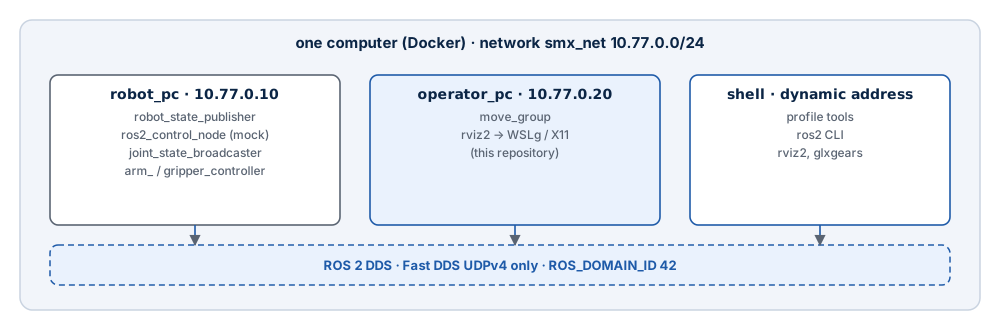
| Setting | Robot PC | Operator PC |
|---|---|---|
| Network | creates smx_net (10.77.0.0/24, SMX_SUBNET) |
joins it as external |
| Address | 10.77.0.10 (SMX_ROBOT_IP) |
10.77.0.20 (SMX_OPERATOR_IP) |
ROS_DOMAIN_ID |
42 | 42 |
RMW_IMPLEMENTATION |
rmw_fastrtps_cpp |
rmw_fastrtps_cpp |
| Fast DDS profile | docker/dds/fastdds_udp.xml |
the same file, copied at build time to /etc/smx/fastdds_udp.xml |
ROS_AUTOMATIC_DISCOVERY_RANGE |
SUBNET |
The Fast DDS profile: UDP only
Fast DDS uses shared memory between participants it believes are on the same host.
Containers on one computer have separate /dev/shm, so discovery can succeed while no
data arrives — the nodes are listed, but topics stay silent. The profile disables the
built-in transports and keeps all traffic on UDPv4:
<participant profile_name="smx_udp_only" is_default_profile="true">
  <rtps>
    <userTransports>
      <transport_id>smx_udpv4</transport_id>
    </userTransports>
    <useBuiltinTransports>false</useBuiltinTransports>
  </rtps>
</participant>
UDP is also what the real Ethernet link carries, so simulation and hardware use the same
transport. The file belongs to the Robot PC repository; the image build copies it, so a
change there reaches the Operator PC with the next --build.
Two computers: real Ethernet
When the Robot PC moves to its own board (Raspberry Pi CM4, Jetson or an Ubuntu 24.04
PC), replace smx_net by the host network on both sides:
- In both Compose files, remove the
networksentries of the services and thesmx_netdeclaration, and addnetwork_mode: host. - Keep
ROS_DOMAIN_ID,RMW_IMPLEMENTATIONand the Fast DDS profile unchanged. - Make sure both computers are in one subnet and the firewall lets DDS through (UDP, ports 7400 and up for domain 42 — the RTPS ports are computed from the domain ID; the simplest rule allows UDP between the two hosts).
- Check discovery from both sides with
ros2 node list, thenros2 topic echo /joint_states --onceon the Operator PC.
network_mode: host gives a container the network of the Docker host. On Linux that is
the real network. With Docker Desktop on Windows the Docker host is a VM, so a host-mode
container is not necessarily reachable from the Robot PC; verify discovery in both
directions, or run the Operator PC on a Linux computer for two-host operation.
Native Windows ROS 2 cannot join
ROS 2 installed natively on Windows does not discover the containers on smx_net:
Docker Desktop does not route multicast between Windows and its container networks. Run
every ROS 2 node of the system in a container on that network — for the command line, use
the shell service.
SSH is not a ROS transport
SSH is for administration (logs, updates, starting containers on the Robot PC). ROS 2 topics and actions always go over DDS; do not tunnel or forward them through SSH.
Checklist
| Check | Command (in the shell service) |
Expected |
|---|---|---|
| Same domain | echo $ROS_DOMAIN_ID |
42 on both sides |
| Discovery | ros2 node list |
/move_group, /rviz2, /robot_state_publisher, /controller_manager, … |
| Joint states | ros2 topic echo /joint_states --once |
Six joint names with positions |
| Controllers | ros2 control list_controllers |
arm_controller, gripper_controller, joint_state_broadcaster active |
| Actions | ros2 action list |
/arm_controller/follow_joint_trajectory, /gripper_controller/follow_joint_trajectory |
| Profile | echo $FASTDDS_DEFAULT_PROFILES_FILE |
/etc/smx/fastdds_udp.xml |