Architecture
The Operator PC is one of the two ROS 2 computers of SmartManipulator-X. This page shows how its nodes connect to the Robot PC, what crosses the network, and which rules keep the two sides consistent. The architecture of the whole system (controller firmware, FPGA, hardware) is on the system site.
ROS 2 graph
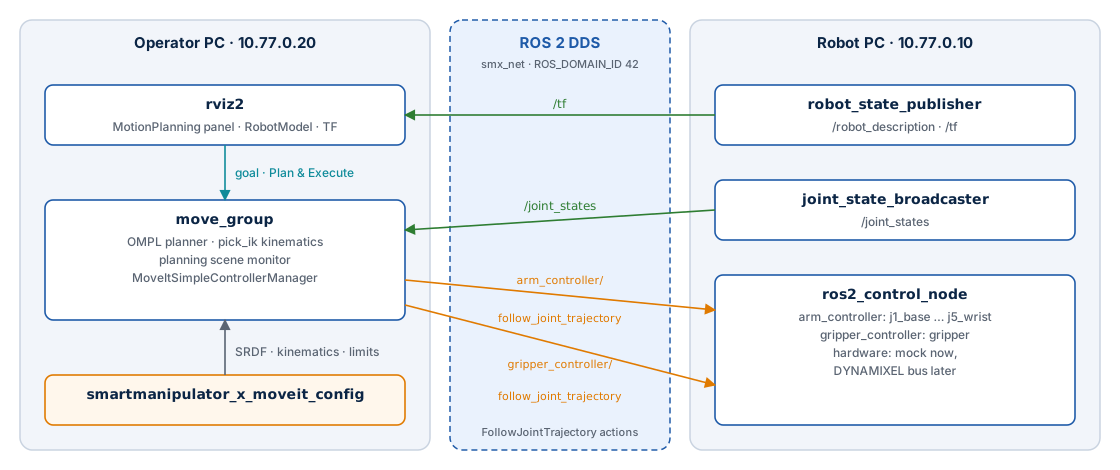
| Node | Computer | Started by | Role |
|---|---|---|---|
move_group |
Operator PC | operator.launch.py |
Planning (OMPL), IK (pick_ik), planning scene, trajectory execution |
rviz2 |
Operator PC | operator.launch.py (rviz:=true) |
MotionPlanning plugin, operator interface |
robot_state_publisher |
Robot PC | robot.launch.py |
/robot_description, /tf from /joint_states |
ros2_control_node |
Robot PC | robot.launch.py |
Controller manager at 100 Hz, hardware interface (mock now) |
joint_state_broadcaster |
Robot PC | spawner | /joint_states from the hardware state interfaces |
arm_controller, gripper_controller |
Robot PC | spawner | joint_trajectory_controller, position command interface |
What crosses the network
| Interface | Type | Direction | Used for |
|---|---|---|---|
/joint_states |
topic sensor_msgs/JointState |
Robot PC → Operator PC | Current state of the arm for move_group and RViz2 |
/tf, /tf_static |
topics | Robot PC → Operator PC | Frames of the robot (RViz2 TF and RobotModel displays) |
/robot_description |
topic, transient local | both | Published by robot_state_publisher and, with the same model, by move_group (publish_robot_description); read by the RobotModel display (off by default) |
/arm_controller/follow_joint_trajectory |
action control_msgs/FollowJointTrajectory |
Operator PC → Robot PC | Arm trajectories (J1–J5) |
/gripper_controller/follow_joint_trajectory |
action control_msgs/FollowJointTrajectory |
Operator PC → Robot PC | Gripper trajectories |
/display_planned_path, /monitored_planning_scene, MoveIt actions and services |
inside the Operator PC | RViz2 ↔ move_group |
Nothing else is needed from the Robot PC: no controller-manager services, no USB device, no file system.
The robot model on both sides
move_group and RViz2 do not read /robot_description from the Robot PC to plan. The
launch file expands the same Xacro file the Robot PC uses —
smartmanipulator_x_description/urdf/smartmanipulator_x.urdf.xacro — which the image build
copied from the Robot PC repository (see build contexts):
MoveItConfigsBuilder("smartmanipulator_x", package_name="smartmanipulator_x_moveit_config")
    # Same model as the Robot PC; the hardware block is irrelevant to MoveIt.
    .robot_description(file_path=description_xacro, mappings={"use_mock_hardware": "true"})
The use_mock_hardware mapping only selects the ros2_control block of the Xacro, which
MoveIt ignores. Links, joints, limits and meshes are identical to the Robot PC's — as long
as both images were built from the same Robot PC commit. After a change to the robot
description, rebuild both images.
Responsibilities and boundaries
| Rule | Why |
|---|---|
The Operator PC never opens the controller's USB device; do not pass /dev/ttyACM0 to it |
Only the Robot PC owns the hardware path and its safety |
No URDF/Xacro in this repository; consume smartmanipulator_x_description |
One canonical model, generated from the Moveo CAD |
| No OpenMANIPULATOR-X model or configuration as a stand-in for the Moveo | Different geometry, joints and actuators |
Controller names and joints in moveit_controllers.yaml match controllers.yaml of the Robot PC |
Otherwise MoveIt cannot find the action servers or the joints do not match |
| MoveIt 2, RViz2 and (later) Gazebo stay out of the Robot PC image | The Robot PC stays lean and headless |
| ROS 2 data goes over DDS, never over SSH | SSH is for administration only |
Real robot and simulation
The same MoveIt configuration is meant to drive either path; the robot model, joint names, limits, planning groups and controller semantics must agree in both:
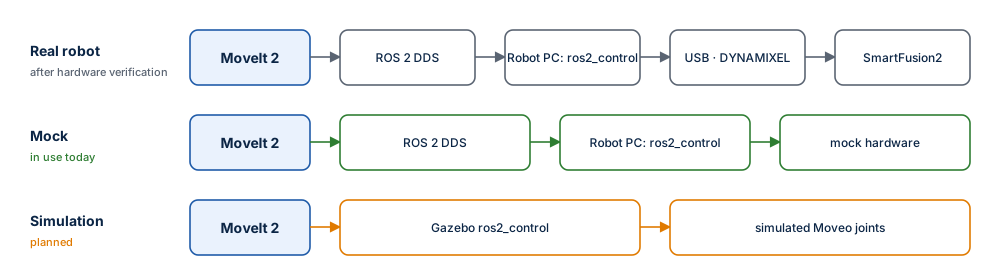
Today the Operator PC drives the mock path. The real path becomes available when the Robot PC enables its verified DYNAMIXEL hardware configuration; nothing changes on the Operator PC for that. Gazebo integration will live in this repository.
Package layout
ros2_ws/src/smartmanipulator_x_moveit_config/
├── package.xml                     ament_cmake; exec-depends on MoveIt, pick_ik, RViz2, the description
├── CMakeLists.txt                  installs config/, launch/, rviz/
├── config/
│   ├── smartmanipulator_x.srdf     planning groups, named states, end effector, collision matrix
│   ├── kinematics.yaml             pick_ik, position-only
│   ├── joint_limits.yaml           accelerations and default scaling
│   └── moveit_controllers.yaml     arm_controller, gripper_controller, execution tolerances
├── launch/operator.launch.py       move_group + RViz2
└── rviz/moveit.rviz                RViz2 layout
Each file is described in MoveIt 2 configuration.