Docker image and Compose
The Operator PC runs entirely in Docker: one image, two Compose services, and the GUI shown on the host through WSLg (Windows 11) or X11 (Linux). ROS 2 is not installed on the host.
| File | Content |
|---|---|
docker/Dockerfile |
ros:jazzy-ros-base with MoveIt 2, pick_ik, RViz2; builds the workspace |
docker/docker-compose.yml |
operator_pc (move_group + RViz2) and shell (profile tools) on the network smx_net |
docker/entrypoint.sh |
Sources ROS 2 and the built workspace, then runs the command |
docker/env.example |
Template for docker/.env |
.dockerignore |
Keeps build output, editor files and the documentation out of the build context (the repository root) |
The image
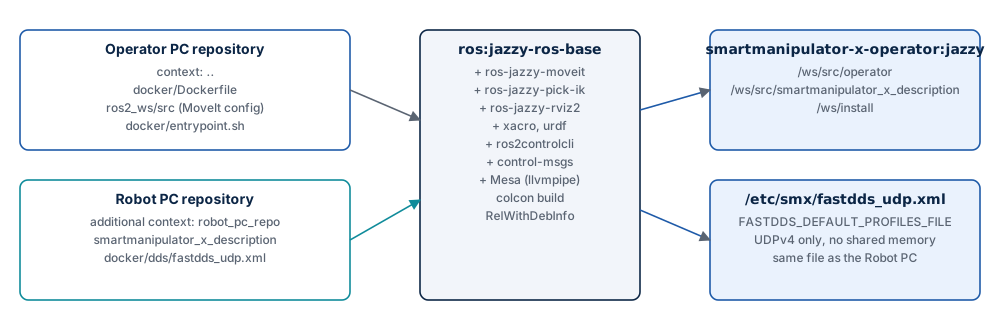
| Step | Content |
|---|---|
| Base | ros:jazzy-ros-base (Ubuntu 24.04, ROS 2 Jazzy) |
| Packages | ros-jazzy-moveit, ros-jazzy-pick-ik, ros-jazzy-rviz2, ros-jazzy-xacro, ros-jazzy-urdf, ros-jazzy-ros2controlcli, ros-jazzy-control-msgs, python3-colcon-common-extensions, Mesa (libgl1-mesa-dri, mesa-utils) |
| Robot description | smartmanipulator_x_description from the Robot PC repository → /ws/src/smartmanipulator_x_description |
| DDS profile | docker/dds/fastdds_udp.xml from the Robot PC repository → /etc/smx/fastdds_udp.xml |
| Project packages | ros2_ws/src of this repository → /ws/src/operator |
| Build | colcon build --symlink-install, RelWithDebInfo |
| Shell | .bashrc sources /opt/ros/jazzy and /ws/install, so docker exec … bash has ROS 2 ready |
Environment of the image:
| Variable | Value |
|---|---|
ROS_DISTRO |
jazzy |
ROS_WS |
/ws |
RMW_IMPLEMENTATION |
rmw_fastrtps_cpp |
ROS_DOMAIN_ID |
42 (Compose overrides it from docker/.env) |
FASTDDS_DEFAULT_PROFILES_FILE, FASTRTPS_DEFAULT_PROFILES_FILE |
/etc/smx/fastdds_udp.xml |
TZ |
Europe/Warsaw |
The image tag is smartmanipulator-x-operator:jazzy (SMX_OPERATOR_IMAGE).
Build contexts
The robot description and the DDS profile are not copied into this repository. The
Dockerfile reads them from a second build context, robot_pc_repo, which Compose points
at the Robot PC checkout:
build:
  context: ..
  dockerfile: docker/Dockerfile
  additional_contexts:
    # Canonical robot description and DDS profile.
    robot_pc_repo: ${SMX_ROBOT_PC_REPO:-../../SmartManipulator-X-Robot-PC}
COPY --from=robot_pc_repo ros2_ws/src/smartmanipulator_x/smartmanipulator_x_description \
     ${ROS_WS}/src/smartmanipulator_x_description
COPY --from=robot_pc_repo docker/dds/fastdds_udp.xml /etc/smx/fastdds_udp.xml
So both computers always use the same joints and transport settings. The relative path
is resolved from docker/; the default expects both repositories side by side. This
needs Docker Compose v2.17 or later and BuildKit.
To build without Compose:
docker build -f docker/Dockerfile \
    --build-context robot_pc_repo=../SmartManipulator-X-Robot-PC \
    -t smartmanipulator-x-operator:jazzy .
Services
| Service | Profile | Network | Command | Use |
|---|---|---|---|---|
operator_pc |
default | smx_net, fixed 10.77.0.20 (SMX_OPERATOR_IP) |
ros2 launch smartmanipulator_x_moveit_config operator.launch.py |
move_group + RViz2 |
shell |
tools |
smx_net, dynamic address |
bash (interactive) |
ROS 2 CLI, rviz2 alone, glxgears |
Both use init: true (a small init process reaps child processes) and the same ROS and
GUI environment. operator_pc stops with SIGINT, like Ctrl+C in a terminal, so
ros2 launch shuts its nodes down cleanly.
docker compose -f docker/docker-compose.yml up --build operator_pc     # start
docker compose -f docker/docker-compose.yml run --rm shell             # shell
docker compose -f docker/docker-compose.yml build operator_pc          # rebuild only
docker compose -f docker/docker-compose.yml build --no-cache --pull operator_pc   # from scratch
docker compose -f docker/docker-compose.yml down                       # remove containers
smx_net is declared external: it belongs to the Robot PC Compose project, which
creates it. down here leaves it in place.
Environment
Every value has a default in docker-compose.yml. Copy docker/env.example to
docker/.env only to change one; docker/.env is ignored by Git.
| Variable | Default | Meaning |
|---|---|---|
ROS_DOMAIN_ID |
42 |
Must match the Robot PC |
SMX_OPERATOR_IP |
10.77.0.20 |
Address of operator_pc on smx_net (the Robot PC is 10.77.0.10) |
SMX_ROBOT_PC_REPO |
../../SmartManipulator-X-Robot-PC |
Robot PC checkout, relative to docker/ or absolute |
SMX_OPERATOR_IMAGE |
smartmanipulator-x-operator:jazzy |
Image name and tag |
SMX_X11_DIR |
/run/desktop/mnt/host/wslg/.X11-unix |
Host directory mounted as /tmp/.X11-unix |
SMX_WSLG_DIR |
/run/desktop/mnt/host/wslg |
Host directory mounted as /mnt/wslg |
SMX_DISPLAY |
:0 |
DISPLAY |
SMX_WAYLAND_DISPLAY |
wayland-0 |
WAYLAND_DISPLAY |
SMX_XDG_RUNTIME_DIR |
/mnt/wslg/runtime-dir |
XDG_RUNTIME_DIR |
SMX_PULSE_SERVER |
/mnt/wslg/PulseServer |
PULSE_SERVER (WSLg audio; unused by RViz2) |
SMX_LIBGL_ALWAYS_SOFTWARE |
1 |
1: software OpenGL (llvmpipe) |
Fixed in the Compose file: RMW_IMPLEMENTATION=rmw_fastrtps_cpp,
ROS_AUTOMATIC_DISCOVERY_RANGE=SUBNET, QT_QPA_PLATFORM=xcb, QT_X11_NO_MITSHM=1.
GUI on Windows 11 (WSLg)
The defaults are made for Docker Desktop with the WSL 2 backend. Docker Desktop exposes
the WSLg sockets of its VM under /run/desktop/mnt/host/wslg; Compose mounts them into
the container, and RViz2 draws through X11 (QT_QPA_PLATFORM=xcb) on the WSLg display
:0. Nothing has to be configured; run the Compose commands from PowerShell or from a
WSL distribution.
GUI on a Linux desktop (X11)
Allow local containers to connect to your X server once per session, and set the X11
values in docker/.env:
# docker/.env
SMX_X11_DIR=/tmp/.X11-unix
SMX_WSLG_DIR=/tmp/smx-no-wslg
SMX_DISPLAY=:0
SMX_XDG_RUNTIME_DIR=/tmp
SMX_DISPLAY must match echo $DISPLAY on the host. SMX_WSLG_DIR only needs to be a
path that exists or can be created; nothing is used from it on Linux.
Rendering
LIBGL_ALWAYS_SOFTWARE=1 (Mesa llvmpipe) is the default because it works on every host,
without GPU drivers in the container. RViz2 with the Moveo model is usable this way;
it costs CPU. With a working GPU path (for example /dev/dri passed through on Linux with a
Compose override, or the WSLg D3D12 driver), set SMX_LIBGL_ALWAYS_SOFTWARE=0. Check with glxinfo -B or
glxgears in the shell service which renderer is in use.